 中文
中文 English
Products
地址:深圳市龙华区大浪街道华兴路富隆特工业园5栋4号门3楼
电话:0755-28154462
传真:0755-28153709
邮箱:lianhongtai@sohu.com
bowutech@163.com
电话:0755-28154462
传真:0755-28153709
邮箱:lianhongtai@sohu.com
bowutech@163.com
USB Extender
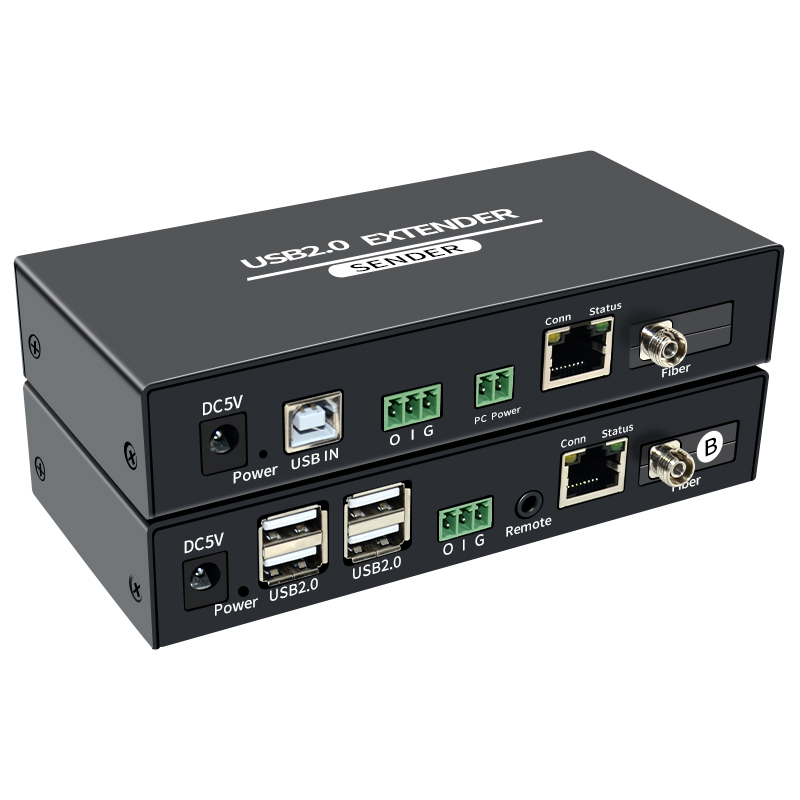


USB2.0 Fiber/Network Extender
UKE100M/20KM-2.0
The Extender via single CAT-5E/6 cable to extend the USB2.0 signal up to 100meters, or via single fiber cable to extend the USB2.0 signal up 20KM. The extender support low speed, full speed, high speed USB signal. When transmitting the USB data, the extender also can support low speed full duplex data transmission. In order to make sure the low speed transmission stable, the full duplex speed should be not higher than 1Byte per second. In the meanwhile, the computer can be started up, shutdown, or reboot via the extender in a long distance at the Receiver. In the condition that the computer can not be touched, the extender will be a superb choice.
FEATURES
This Extender has many features that enable it to perform in superior manner, among those features and you will find:
SPECIFICATIONS
1) In order to achieve the high transmission quality please choose the shielded cat-5e or cat-6 cable.
2) The cables with lower quality will not achieve the perfect transmission effect and long distance.
3) Theoretically the function of the product is normal when adopt short distance transmission.
If the product cannot transmit long distance, that is to say, there are quality problems in the transmission cables
4. Installation steps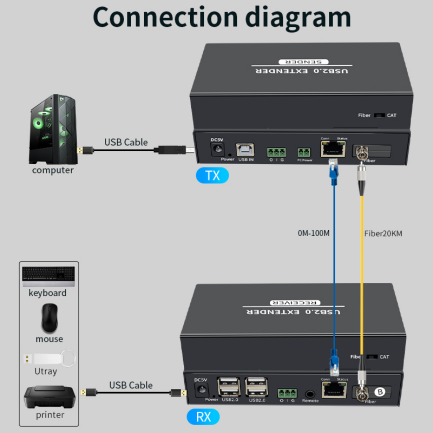
This Extender has many features that enable it to perform in superior manner, among those features and you will find:
- Compact size, One pair as a full functional module, no need of settings.
- Via single CAT-5e/6 cable or fiber cable to achieve long distance transmission.
- CAT-5e/6 follow the standard of IEEE-568B.
- Transmission speed up to USB2.0 high speed.
- When transmitted via CAT cable, the yellow LED(Conn), indicates waiting for connection if flashes slowly, indicates connection successfully when flashes fast.
- When transmitted via CAT cable, the green LED(Status), indicates data communication normally between the Sender and Receiver if it flashes.
SPECIFICATIONS
1) In order to achieve the high transmission quality please choose the shielded cat-5e or cat-6 cable.
2) The cables with lower quality will not achieve the perfect transmission effect and long distance.
3) Theoretically the function of the product is normal when adopt short distance transmission.
If the product cannot transmit long distance, that is to say, there are quality problems in the transmission cables
4. Installation steps
- Connect the USB device to the Receiver.
- Connect the remote computer power cable and accessory to the “Remote” on the Receiver.
- Connect the data Sender’s input to the “O”, output to the “I”, ground to the “G” on the Receiver.
- Connect the computer and Sender with the USB A-B cable.
- Connect the computer power PIN and the “PC Power” on the Sender with 2 PIN cable.
- Connect the Sender and Receiver with CAT-5E/6 cable or fiber.
- Push the button to “CAT” or “Fiber” both on the Sender and Receiver.
- Power on the Sender and Receiver
- Connection Diagram
店铺直达